Advanced IGL Laboratory Walkthrough Video v1.3.0 (November 2026)
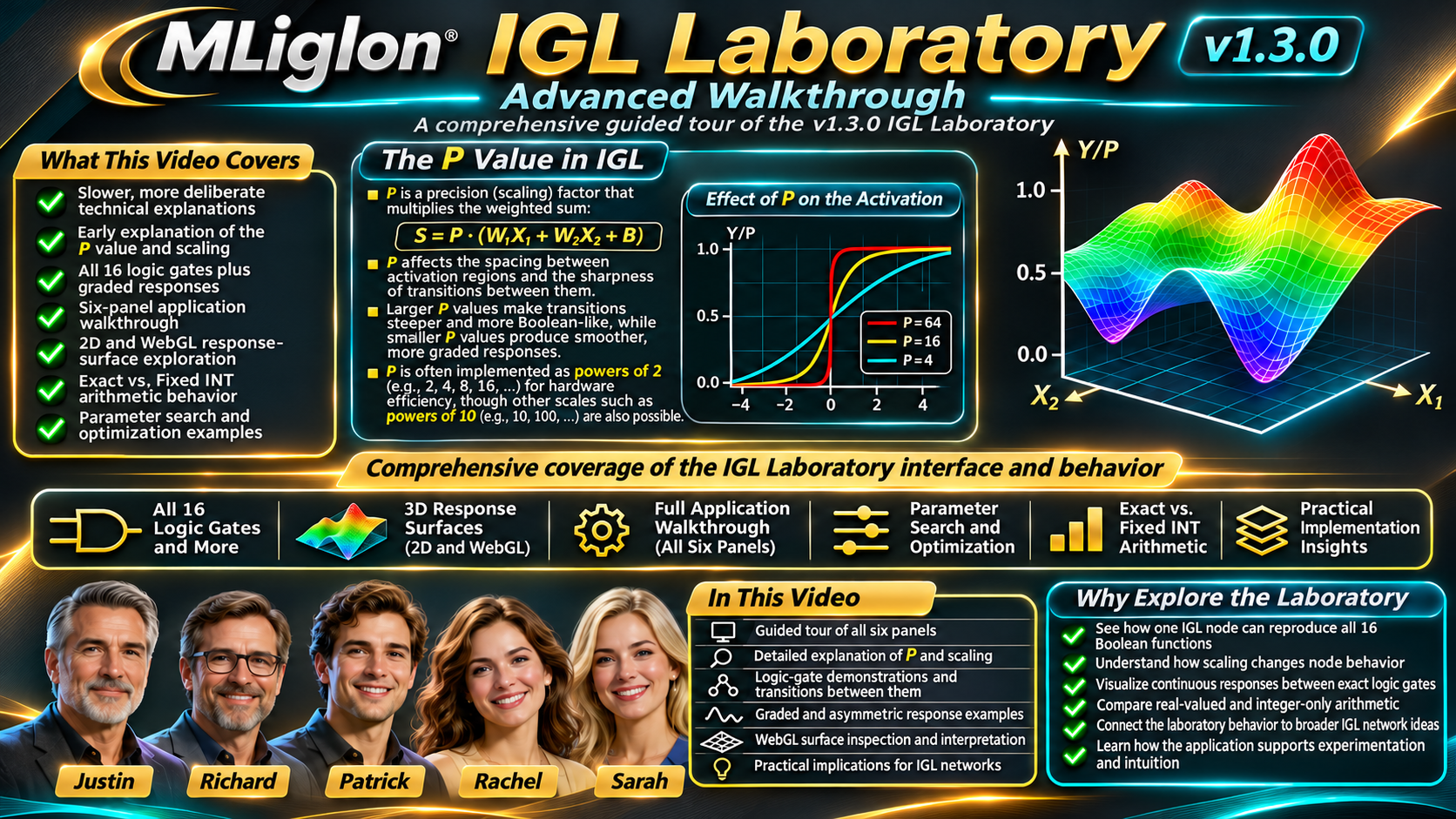
MLiglon IGL Laboratory — Advanced Video Walkthrough
An In-Depth Exploration of Integer Gate Logic, Neural Network Computation, and Interactive AI Experimentation
Discover how a fundamentally different approach to neural network computation can reproduce familiar Boolean logic functions while extending beyond traditional binary outputs into continuous, graded, and nonlinear behavior.
This comprehensive video presentation provides an advanced, guided exploration of the MLiglon Integer Gate Logic (IGL) Laboratory v1.3.0, an interactive research demonstrator designed to make the underlying mathematics, computational behavior, and practical possibilities of IGL accessible to engineers, researchers, students, and technology professionals.
Through detailed demonstrations, mathematical explanations, real application screenshots, and engaging discussions among five AI-narrated presenters, viewers explore how a single IGL node can reproduce all 16 possible two-input Boolean functions, including AND, OR, XOR, XNOR, NAND, and NOR. The presentation then moves beyond conventional logic gates to examine the graded, asymmetric, and continuously variable responses that emerge from changes to node parameters.
Particular attention is devoted to the IGL P parameter, which establishes the scale of the activation function and its computational regions. The video explains why P is important, how changing its value affects node behavior, how parameter rescaling can preserve logic functions, and why powers of two are especially useful in efficient integer-based hardware implementations.
What You’ll Discover
- The IGL computational model: Weighted inputs, bias, the patented five-region non-monotonic activation function, and normalized outputs.
- All 16 Boolean logic functions: How different parameter configurations allow a single IGL node to reproduce the complete family of two-input logic gates.
- Beyond binary logic: Soft, graded, and asymmetric responses, including the continuous behaviors between traditional logic functions.
- Understanding P: Activation scaling, numerical precision, parameter relationships, and considerations for efficient hardware computation.
- The complete six-panel laboratory: Interactive node controls, activation graphs, truth tables, arithmetic traces, 3D response surfaces, and illustrative parameter optimization.
- Exact versus fixed-integer arithmetic: How quantization affects calculations and why integer-based representations matter for practical AI systems.
- Interactive 3D visualization: Exploring the IGL response surface through WebGL rotation, zooming, projection settings, color schemes, cross-sections, and numerical inspection.
- Learning and optimization: How changes to weights and bias influence outputs, how candidate parameter configurations can be evaluated, and how these concepts relate to broader IGL network training.
- Practical engineering implications: Opportunities for compact neural networks, embedded computing, intelligent sensors, robotics, and other Edge AI applications.
From Theory to Experimentation
Rather than simply describing IGL, the presentation emphasizes understanding the technology through observable computational behavior. Viewers follow realistic experiments, examine the consequences of individual parameter changes, and see how relatively simple mathematical operations can produce unexpectedly rich decision surfaces.
The laboratory’s illustrative local candidate search also introduces the principles of evaluating and improving node configurations, while distinguishing this educational example from the complete patented IGL training methodology.
The result is a detailed introduction to both how to use the IGL Laboratory and why the underlying architecture is scientifically and technologically interesting.
Explore a Different Approach to Artificial Intelligence
Whether you are an AI researcher investigating alternative neural network architectures, a software engineer interested in integer-based computation, or a technology professional evaluating the possibilities of efficient Edge AI, this advanced walkthrough offers a practical foundation for understanding Integer Gate Logic.
Watch the presentation, explore the mathematical behavior, and then experiment directly with the interactive IGL Laboratory.
This presentation is an educational technical demonstration. The laboratory illustrates single-node computation and selected optimization principles; it is not a complete implementation or performance benchmark of a trained, multilayer IGL network.
Video Chapters & Timeline
Choose a topic to jump to that part of the 1-hour, 51-minute Advanced Walkthrough. Expand a section to browse all 75 scenes.
01 Start Here — Orientation 00:00–08:14
- 00:00The IGL Laboratory · Advanced Technical WalkthroughMeet the five-presenter walkthrough and see what the interactive laboratory demonstrates.
- 01:48Why the IGL Laboratory existsWhy observable node behavior and independently testable results matter.
- 03:44Open the laboratory in your browserFind the browser-based demonstration and prepare for the walkthrough.
- 05:04Interface tour: from top toolbar to six panelsLocate the toolbar, preset controls, and six principal panels.
- 06:44First session: a ten-minute routeFollow a practical first-session route through the most important controls.
02 IGL Mathematics & the P Parameter 08:14–23:26
- 08:14The two-input IGL nodeUnderstand weighted inputs, bias, the activation function, and normalized output.
- 10:04P: the scale parameter that shapes every node outputWhy P sets the activation scale and is not a probability.
- 12:08The mathematics of P: normalized geometryCompare scaled inputs, activation breakpoints, and normalized response geometry.
- 14:08P and fixed-point arithmetic across a networkExplore how fixed-point scaling supports compatible node-to-node calculations.
- 16:18Why powers of two are hardware-friendlyWhy binary powers of two can simplify efficient integer implementations.
- 18:28Demonstration: changing P can preserve XOR—or create ANDSee how coordinated rescaling preserves XOR while unscaled changes can produce AND.
- 20:24Using the P selector and the rescale optionUse the P selector and the option to rescale weights and bias.
- 21:48The patented five-region activation shapeExamine the five piecewise-linear regions of the IGL activation.
03 All 16 Boolean Logic Functions 23:26–41:12
- 23:26Boolean truth tables: why there are exactly 16Four binary input combinations permit exactly sixteen distinct output patterns.
- 25:04Gate 01 · FALSEInspect the exact parameters, four weighted sums, and truth table for FALSE.
- 25:54Gate 02 · ANDInspect the exact parameters, four weighted sums, and truth table for AND.
- 27:04Gate 03 · A AND NOT BInspect the exact parameters, four weighted sums, and truth table for A AND NOT B.
- 28:10Gate 04 · A (X1)Inspect the exact parameters, four weighted sums, and truth table for A (X1).
- 29:08Gate 05 · NOT A AND BInspect the exact parameters, four weighted sums, and truth table for NOT A AND B.
- 30:08Gate 06 · B (X2)Inspect the exact parameters, four weighted sums, and truth table for B (X2).
- 31:14Gate 07 · XORInspect the exact parameters, four weighted sums, and truth table for XOR.
- 32:30Gate 08 · ORInspect the exact parameters, four weighted sums, and truth table for OR.
- 33:38Gate 09 · NORInspect the exact parameters, four weighted sums, and truth table for NOR.
- 34:34Gate 10 · XNORInspect the exact parameters, four weighted sums, and truth table for XNOR.
- 35:40Gate 11 · NOT BInspect the exact parameters, four weighted sums, and truth table for NOT B.
- 36:30Gate 12 · A OR NOT BInspect the exact parameters, four weighted sums, and truth table for A OR NOT B.
- 37:34Gate 13 · NOT AInspect the exact parameters, four weighted sums, and truth table for NOT A.
- 38:28Gate 14 · NOT A OR BInspect the exact parameters, four weighted sums, and truth table for NOT A OR B.
- 39:18Gate 15 · NANDInspect the exact parameters, four weighted sums, and truth table for NAND.
- 40:20Gate 16 · TRUEInspect the exact parameters, four weighted sums, and truth table for TRUE.
04 Graded Responses & Fixed-Integer Arithmetic 41:12–52:26
- 41:12The four graded example presetsExplore soft XOR, graded AND, asymmetric, and other nonbinary examples.
- 42:58Fixed INT: the implemented arithmetic pathTrace input quantization, integer arithmetic, activation, and normalized output.
- 44:50Activation scale study · P = 1Study activation behavior and numeric resolution with P = 1.
- 45:58Activation scale study · P = 2Study activation behavior and numeric resolution with P = 2.
- 46:54Activation scale study · P = 4Study activation behavior and numeric resolution with P = 4.
- 48:10Activation scale study · P = 8Study activation behavior and numeric resolution with P = 8.
- 49:10Activation scale study · P = 16Study activation behavior and numeric resolution with P = 16.
- 50:18Activation scale study · P = 32Study activation behavior and numeric resolution with P = 32.
- 51:18Activation scale study · P = 64Study activation behavior and numeric resolution with P = 64.
05 Complete Six-Panel Laboratory Tour 52:26–1:04:06
- 52:26Display toolbar, presets, and learning guideReview presets, display preferences, font controls, and laboratory navigation.
- 53:24Panel 1: node parametersAdjust W1, W2, B, P, arithmetic mode, and the two live input values.
- 54:54Panel 2: five-region activation plotRead the five-region activation graph, breakpoints, and highlighted examples.
- 57:00Panel 3: live truth table and classificationInterpret all four Boolean input combinations and their predicted responses.
- 58:28Panel 4: arithmetic traceFollow the weighted-sum calculation and the currently active activation region.
- 1:00:40Panel 5: the original projected 3D response surfaceUnderstand the built-in projected response-surface visualization.
- 1:02:34Panel 6: illustrative local candidate searchObserve the educational candidate search and how local changes are scored.
06 Interactive WebGL 3D Explorer 1:04:06–1:16:56
- 1:04:06Opening, positioning and closing the explorerOpen, move, resize, and close the separate 3D exploration window.
- 1:05:34Camera controls: orbit, pan, zoom and resetRotate, pan, zoom, and reset the interactive 3D camera.
- 1:06:44Projection, color palettes and surface resolutionChange perspective, orthographic projection, palette, and mesh detail.
- 1:08:14WebGL visibility controlsShow or hide the grid, axis markings, wireframe, and numerical overlays.
- 1:09:30Interactive point inspection and pinningHover to inspect coordinates, pin points, and transfer values to the laboratory.
- 1:11:24Cross-section tools and spatial interpretationUse fixed-X1 or fixed-X2 cross-sections to interpret nonlinear geometry.
- 1:13:10Resizing, fullscreen, export and model synchronizationResize or maximize the explorer, export a PNG, and synchronize model settings.
- 1:15:04Performance and rendering considerationsChoose an appropriate surface resolution and understand rendering tradeoffs.
07 Ten Guided Experiments 1:16:56–1:34:24
- 1:16:56Experiment 1: reproduce XOR with one nodeBuild an exact XOR configuration and inspect all four input combinations.
- 1:18:44Experiment 2: exact XNOR and the effect of biasCompare XNOR with XOR and study the effect of bias.
- 1:20:24Experiment 3: AND, NAND, NOR and ORSwitch among AND, NAND, NOR, and OR and inspect their differing truth tables.
- 1:21:50Experiment 4: asymmetry versus symmetryInvestigate how asymmetric parameters change the response shape.
- 1:23:20Experiment 5: inspect graded logic and continuous inputsExperiment with fractional inputs and graded, nonbinary outputs.
- 1:24:54Experiment 6: Real versus Fixed INTCompare exact arithmetic with Fixed INT using worked results of 0.650 and 0.625.
- 1:27:34Experiment 7: study activation scale and parameter rescalingChange P deliberately and distinguish rescaling from altered node behavior.
- 1:29:08Experiment 8: greedy search toward a different gateUse the local candidate search to improve a gate-matching objective.
- 1:31:00Experiment 9: use cross-sections to find non-monotonic behaviorReveal non-monotonic response features with cross-sectional plots.
- 1:32:58Experiment 10: prepare a reproducible technical observationRecord parameters and outputs for a reproducible technical observation.
08 Validation, Troubleshooting & Practical Use 1:34:24–1:44:23
- 1:34:24Accessibility and presentation tipsUse display size, font choices, and keyboard-accessible controls.
- 1:35:58Troubleshooting your browser sessionResolve common display, loading, and video-browser problems.
- 1:37:24Troubleshooting: the WebGL explorerCheck WebGL compatibility, responsiveness, and graphics limitations.
- 1:39:00Browser processing, privacy and responsible useUnderstand browser-side computation, privacy considerations, and responsible claims.
- 1:40:18What a single-node demonstration can and cannot showDistinguish single-node representational capacity from full neural network training.
- 1:41:38Verification results and known gapsReview numerical verification coverage and the demonstration’s limitations.
- 1:42:54Frequently asked questionsAnswers to common questions about logic, precision, and practical use.
09 IGL Architecture & Next Steps 1:44:23–1:51:03
- 1:44:23What the full IGL architecture addsHow multi-node architectures extend beyond this single-node demonstrator.
- 1:46:20A worked model-checking protocolUse a disciplined protocol to compare parameter settings and check outputs.
- 1:47:58Key lessons: from gates to graded responsesSummarize the path from sixteen Boolean patterns to continuous graded behavior.
- 1:49:28Keep exploring · Final invitationExplore the laboratory, technical materials, and opportunities for further study.